Software Deployment and Delivery
One of the most important steps toward achieving the seamless integration of all components to the EBRAINS Platform is the definition of a unified, consistent software environment. This environment includes all EBRAINS simulation engines and software tools, coupled with an efficient and optimized delivery strategy for deploying it across various execution environments available to EBRAINS users.
Delivery Strategy
To address the challenges posed by the diverse range of tools and the complexities of resolving their conflicting requirements, a delivery strategy leveraging Spack, a specialized package manager for scientific software, has been implemented. This strategy initially focused on making EBRAINS software available in the Collaboratory Lab environment but soon expanded. The wide adoption of the standardized, version-controlled official EBRAINS releases was seen as an excellent opportunity to extend this integrated software environment to HPC systems.
Implementation Overview
This section provides an overview of the delivery strategy, focusing on the specific requirements of the delivery process and offering insights into the fundamental design decisions that shaped the final solution. It also covers the practical implementation of the delivery strategy within the EBRAINS Research Infrastructure, including:
- A detailed breakdown of the deployment workflow.
- Automated testing procedures.
- Release schedule.
- Progress in making the EBRAINS software environment available on Fenix HPC systems.
The delivery strategy builds upon the foundational software delivery process for EBRAINS components and has been continually refined to meet the evolving needs of the platform and its users.
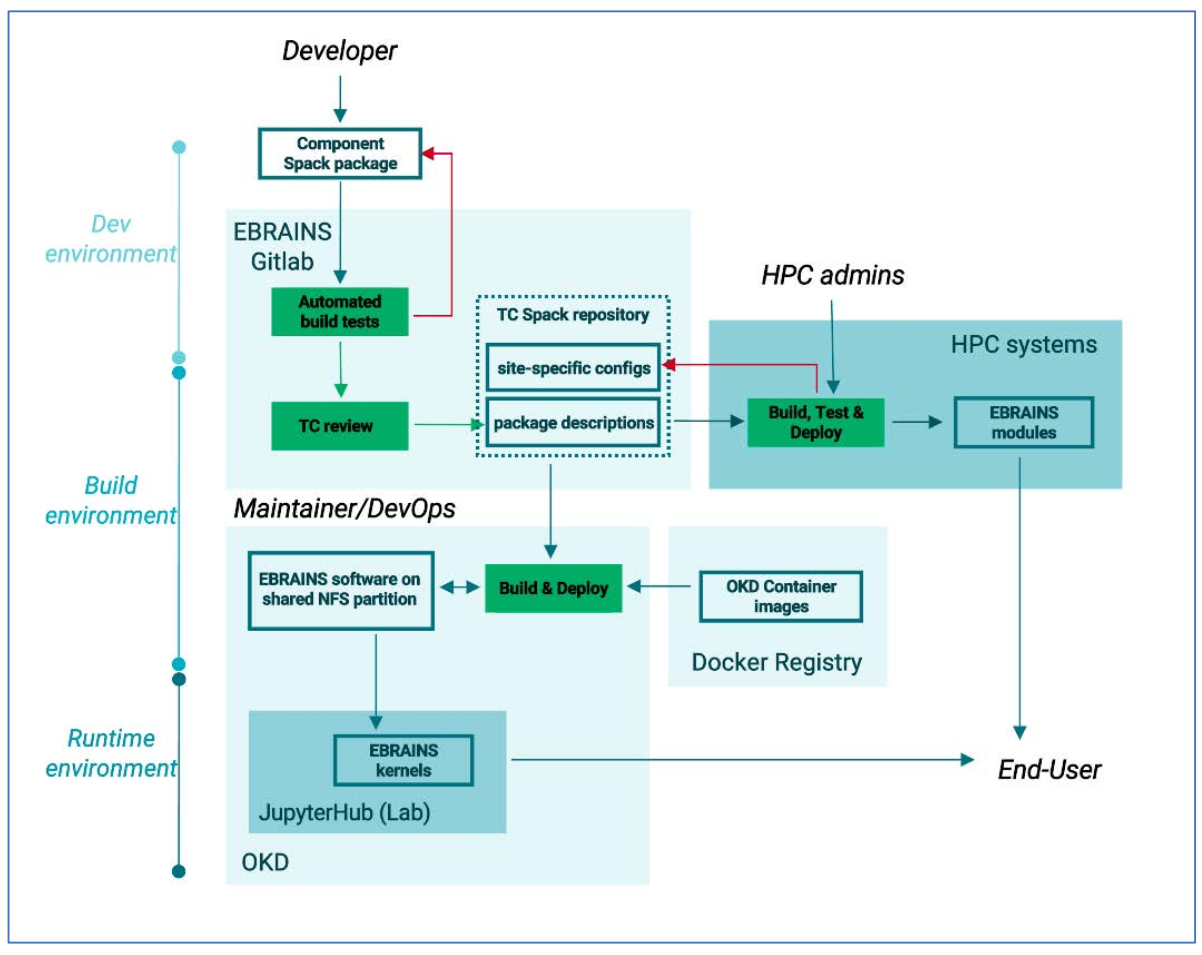
Build and delivery process for the Lab environment
Architecture-wise
The involved EBRAINS services are:
| Platform/Tool | Environment | Description |
|---|---|---|
| GitLab platform (and GitLab CI) | Build environment | It holds the TC-controlled EBRAINS Spack builds repository where the Spack packages of the EBRAINS tools are stored, the site-specific configurations needed for the installation on different systems (see 3.1.2.4), as well as the CI configuration for all the test, build, and deployment operations, that are coordinated via GitLab CI. |
| Docker registry | Build environment | It holds the container images needed to run the build process on OKD, as well as the test build jobs on the GitLab CI runners. |
| OKD Container Platform | Build environment | The build process for the Lab is executed through a Job on OKD. The build job is responsible for pulling the build image from the EBRAINS Docker Registry, transferring all necessary Spack packages, environment configuration files and scripts from the TC repository to the OKD pod that performs the build and installing (or updating) the Spack environment on an NFS partition that is mounted on users’ Lab containers. |
| JupyterLab (Notebooks environment) | Runtime environment | The running container mounts the shared NFS partition (read-only) and loads the Spack environment and all available tools. The different releases of the EBRAINS software environment are available in different Python and R kernels on the Lab startup page (Figure 18). |
Implementation-wise
In direct correspondence with the EBRAINS CI/CD workflow established, we identified, designed, and implemented the integration steps for initiating the software release process:
Integration steps for initiating the software release process
[Component’s official code repository] Development effort
[Gitlab] Init step
Creation of Spack package by COs/tool developers and Merge Request to include it to the official EBRAINS Spack repo.
[Gitlab-OKD] Integration step
- Automated build tests on top of the existing EBRAINS tools, triggered on MR (see 3.1.2.2)
- (the proposed changes are merged after approval by TC)
- Initiation and execution of OKD job that will perform the build on the Integration Lab
- Propagation of the build logs from the OKD build job back to Gitlab.
[Integration Lab] Review step
- Automatic update of the test and experimental JupyterLab kernels on the Integration Lab
- Validation by COs that everything is installed as expected.
[Gitlab-OKD] Delivery step
- Initiation and execution of OKD job that will perform the build on the production Lab.
- Propagation of the build logs from the OKD build job back to Gitlab.
[Manual step] Deployment step
- Creation (or update) of the JupyterLab kernel
- Update of the configuration of the Lab container to activate the new JupyterLab kernel, if necessary (in the case of a new release). This step does not require any downtime of the Lab, since it only affects the startup script of the containers.
Automated build tests and Continuous Integration
While, as described in the previous subsection, the delivery process itself needs to be performed centrally by the TC, it is also essential to provide COs with a development environment where they can work independently and in parallel, before finally submitting the Spack package for inclusion to the repository. Specifically, developers need to be able to update their packages, trigger test builds and have access to the build logs for debugging. However, testing each tool separately is not enough: to ensure the seamless integration of the various tools into one cohesive software ecosystem, it was necessary to implement a testing framework that guarantees their interoperability and compatibility.
To achieve this, an automated build testing process was introduced. When a component owner opens a merge request (MR) that adds or updates an EBRAINS tool, an automated build job is triggered. This build job attempts to install the new version on top of the existing EBRAINS software environment. This way, the integration of the new component with the existing toolset is tested, ensuring that it can function reliably within the common ecosystem.
Additionally, each component is required to define, as part of its Spack package description, a set of tests that sufficiently assess the software’s functionality. Those tests are always executed at installation time for all the freshly installed tools and their dependents, to ensure that the changes introduced do not break the existing installation. This approach allows COs to identify and rectify integration issues early in the development cycle, while also providing a clear and standardised process for testing and validating changes.
To avoid long installation times and prevent unnecessary re-builds, a TC-owned persistent deployment of the EBRAINS software was installed on a read-only file system accessible from the GitLab runners. A shared NFS mount was set up, where only the TC controlled GitLab pipelines have read-write access. This always contains the latest deployment, so that developers can build and test their packages incrementally on top of it directly from GitLab, until all tests are successful.
In summary, the workflow described above effectively creates a complete Continuous Integration /Continuous Testing environment for the EBRAINS developer teams:
- Developers can independently commit their changes to their own private forks and trigger build jobs without interaction with TC.
- The automated test jobs build any updated software on top of the latest version of the EBRAINS deployment, ensuring compatibility with the rest of the EBRAINS environment.
- Spack ensures that the necessary dependencies are resolved consistently (no conflicts).
- Well-defined (by COs) tests run on every new build of each tool (or its dependencies) ensuring functionality.
This way, developers can confidently contribute to the EBRAINS software ecosystem, knowing that their changes will undergo sufficient testing and integration checks. The automated nature of the process reduces human error, accelerates development cycles, and enhances the overall quality of our software stack. Additionally, it encourages component owners to collaborate, share best practices, and maintain a high level of compatibility among tools, ultimately resulting in a more cohesive and efficient environment.
Release Cycle
The diagram below illustrates the various stages involved in developing and deploying the Spack-based versioned library for EBRAINS software. As detailed in the preceding section, the process of incorporating a new tool into the EBRAINS software environment starts with:
- The submission of a Merge Request on the official EBRAINS Spack repository hosted on Gitlab by the Component Owner. These Merge Requests automatically trigger a predefined build test pipeline
- Successful completion of the build tests
- Approval of the changes by the Technical Coordination team
- The new Spack packages are deployed to the Lab’s integration environment, where COs are required to validate their performance to ensure they meet the expected behavior
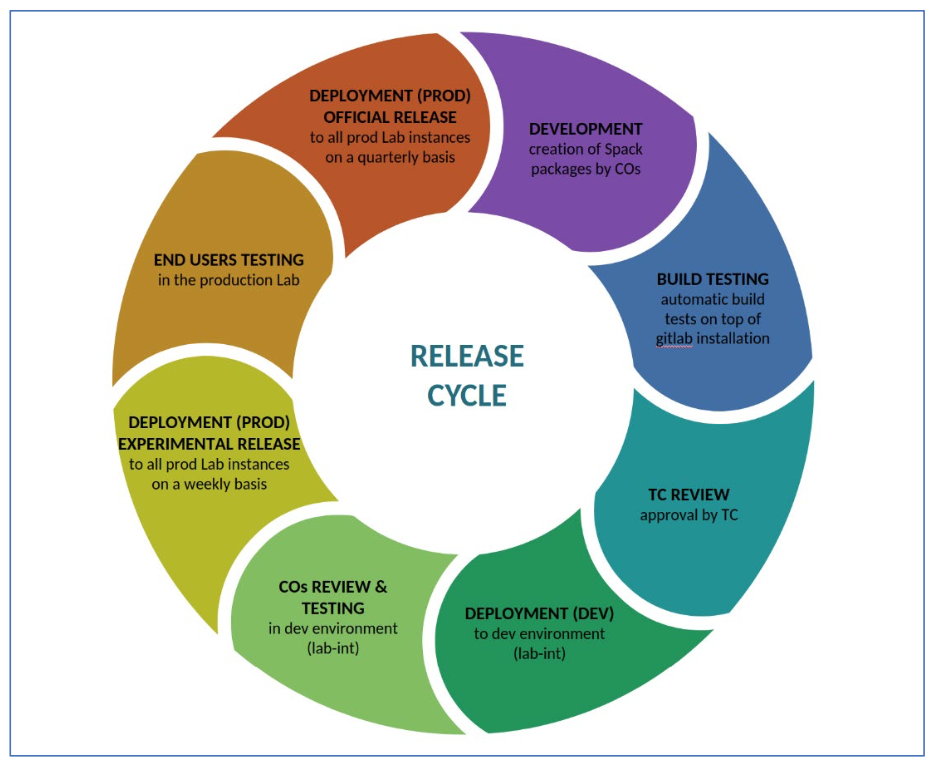
New EBRAINS tools are deployed to production in two stages:
| Deployment Stage | Frequency | Description |
|---|---|---|
| Experimental Deployments | Weekly | The EBRAINS TC team produces weekly experimental deployments of tools to the Lab environment. These deployments serve as a testing ground for new features but are not considered official EBRAINS releases. They are not subject to extensive verification or testing and are replaced by the subsequent Experimental Release. Tools available in an experimental deployment may be overwritten by the next one. Users are advised to use these experimental releases with caution and not depend on them for their production code, as they contain bleeding-edge delivery of new features in the tools. |
| Official EBRAINS Releases | Quarterly | On a quarterly basis, a new official EBRAINS Release is created. Each official release includes the tool binaries and a Python kernel that load all the new tool versions in the user’s path within the Lab environment. These official releases are named following the format “EBRAINS_YY-MM” (e.g., “EBRAINS_22-07”), with the year (YY) and month (MM) denoting when the source code was finalized to create that particular release. Older releases are retained to ensure that users can reproduce their work with older notebooks in the future. |
Preceding each new official production release of EBRAINS tools, a development freeze period is
enacted, limiting the acceptance of Spack packages contributions. During this period, a
release candidate is established, and EBRAINS tool developers and users are encouraged to test it and report any issues. Contributions that have successfully passed testing within two weeks of the release date are eligible for inclusion. Contributions received during these two weeks will be considered for the
subsequent release. It is recommended that users avoid using release candidates in their production
code.