All Visitors
Dashboard for Visitors
For all services registered in EBRAINS Stats (powered by Matomo), a dashboard is available that reports on all visitors, offering insights into overall user engagement, including visit volume, interaction patterns, and the geographical distribution of visitors.
Prerequisites
Integration of the service with EBRAINS Stats service is required. The service must be registered and configured according to the EBRAINS Stats integration guidelines, and analytics data must be successfully sent to the EBRAINS Stats service.
Prompts
| No | Prompt | Description |
|---|---|---|
| 1 | Analysis Of | Select the metric to analyse: Visits or Visitors |
| 2 | Country | Select the country of origin. If set to All, data from all countries is displayed |
| 3 | Visit Type | Select the type of visit. Engaged refers to visits lasting more than 30 seconds, while Bounce refers to shorter visits. If set to All, both visit types are included |
| 4 | Visitor Type | Select the type of visitor. New refers to first-time visitors, while Returning refers to visitors who have accessed the service at least once before. If set to All, both visitor types are included |
| 5 | Time Range | Define the time range for which the dashboard will display data |
Note: Data are available for the period starting from 2024-01-01 up to the day preceding the current date. The selected time range must fall within this interval for results to be displayed.
Sections
Visits/Visitors Analysis
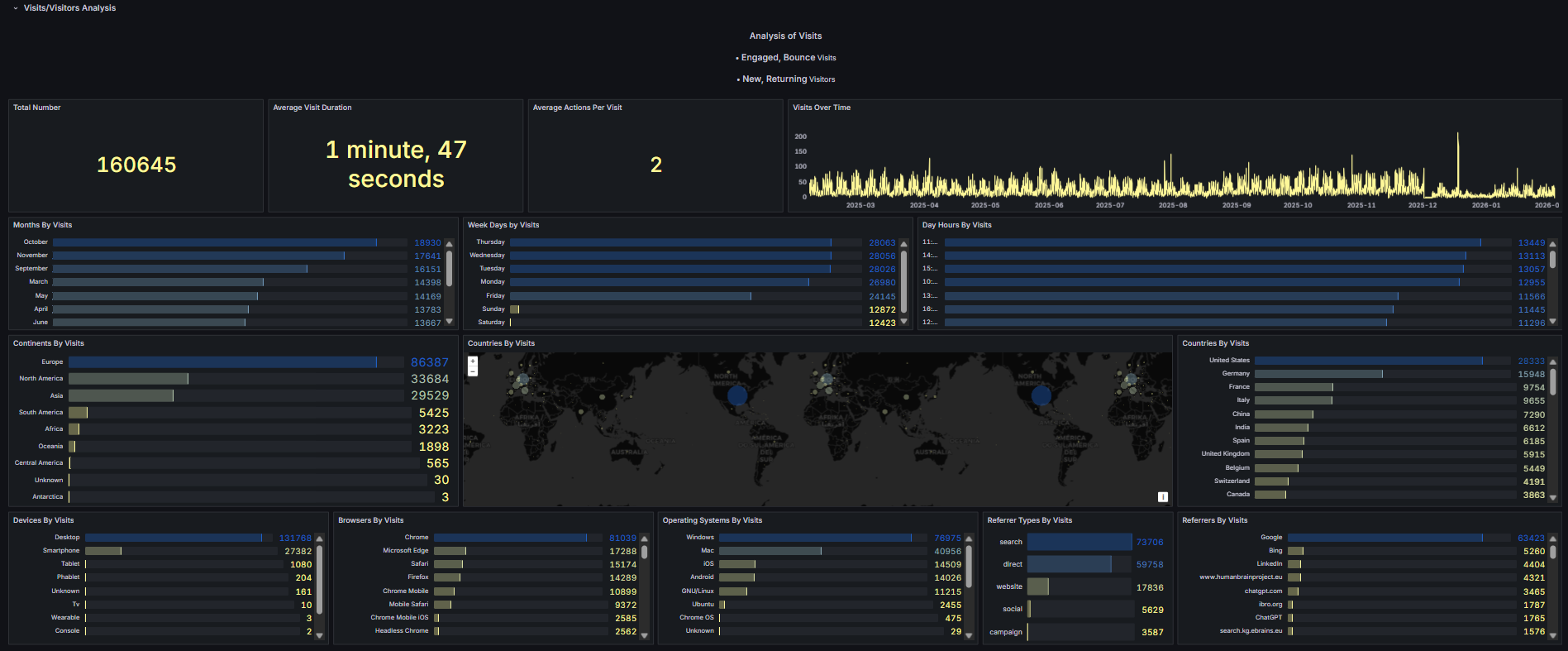
| No | Frame | Description |
|---|---|---|
| 1 | Total Number | Displays the absolute value of the selected KPI based on the applied filters |
| 2 | Average Visit Duration | Displays the average duration of visits based on the applied filters |
| 3 | Average Actions per Visit | Displays the average number of actions performed per visit based on the applied filters |
| 4 | <Analysis-Of> Over Time | Displays the number of visits or visitors over time based on the applied filters |
| 5 | Months by <Analysis-Of> | Displays months categorized by the number of visits or visitors based on the applied filters |
| 6 | Weekdays by <Analysis-Of> | Displays weekdays categorized by the number of visits or visitors based on the applied filters |
| 7 | Day Hours by <Analysis-Of> | Displays hours of the day categorized by the number of visits or visitors based on the applied filters |
| 8 | Continents by <Analysis-Of> | Displays continents categorized by the number of visits or visitors based on the applied filters |
| 9 | Countries by <Analysis-Of> | Displays countries categorized by the number of visits or visitors based on the applied filters |
| 10 | Devices by <Analysis-Of> | Displays devices categorized by the number of visits or visitors based on the applied filters |
| 11 | Browsers by <Analysis-Of> | Displays browsers categorized by the number of visits or visitors based on the applied filters |
| 12 | Operating Systems by <Analysis-Of> | Displays operating systems categorized by the number of visits or visitors based on the applied filters |
| 13 | Referrer Types by <Analysis-Of> | Displays referrer types categorized by the number of visits or visitors based on the applied filters |
| 14 | Referrers by <Analysis-Of> | Displays referrers categorized by the number of visits or visitors based on the applied filters |
Page Analysis
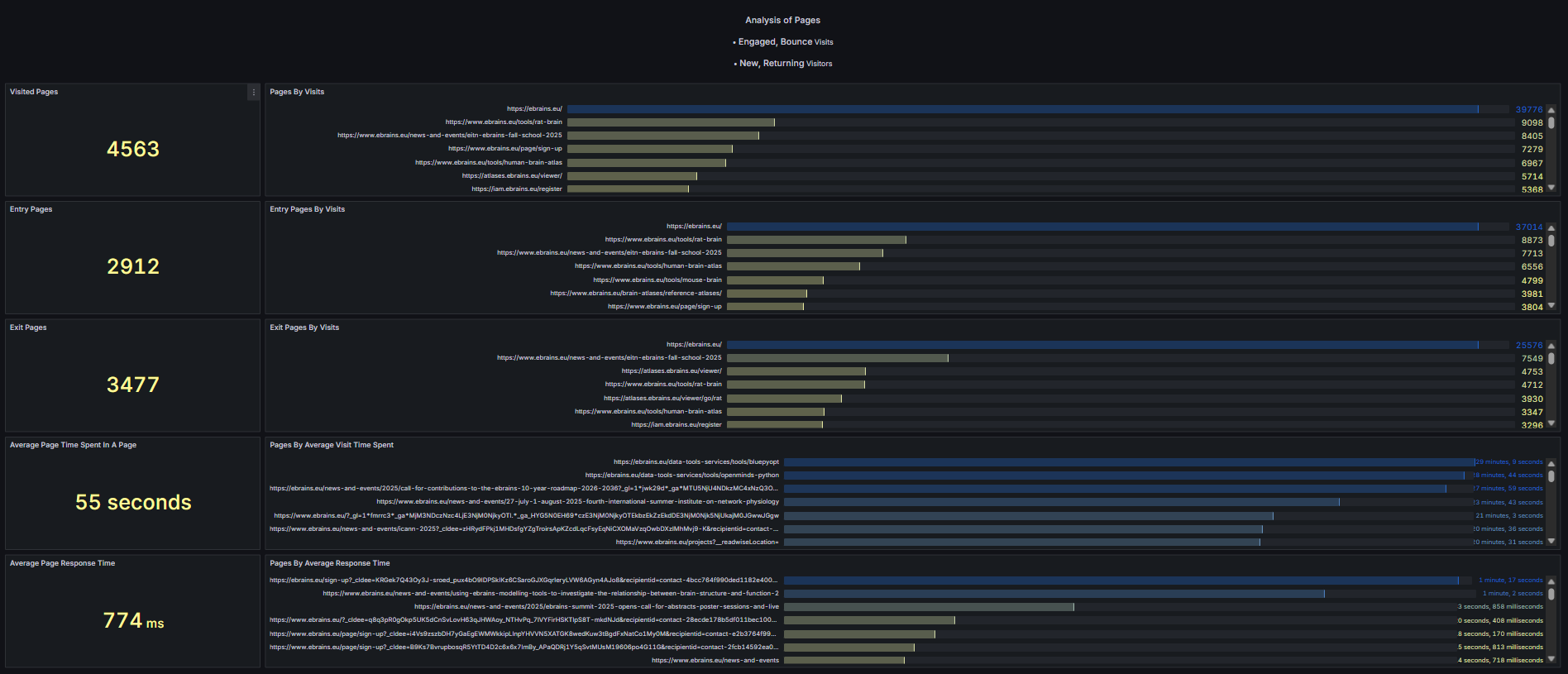
| No | Frame | Description |
|---|---|---|
| 1 | Visited Pages | Displays the total number of pages visited based on the applied filters |
| 2 | Pages by <Analysis Of> | Displays pages categorized by the number of visits or visitors based on the applied filters |
| 3 | Entry Pages | Displays the pages where visitors first entered the service based on the applied filters |
| 4 | Entry Pages by <Analysis Of> | Displays entry pages categorized by the number of visits or visitors based on the applied filters |
| 5 | Exit Pages | Displays the pages where visitors exited the service based on the applied filters |
| 6 | Exit Pages by <Analysis Of> | Displays exit pages categorized by the number of visits or visitors based on the applied filters |
| 7 | Average Time Spent on a Page | Displays the average time spent on a page based on the applied filters |
| 8 | Pages by Average Time Spent | Displays pages categorized by the average time spent per visit based on the applied filters |
| 9 | Average Page Response Time | Displays the average page response time based on the applied filters |
| 10 | Pages by Average Response Time | Displays pages categorized by the average response time based on the applied filters |